Beside the AI Connector: one line to ask this site anything
✍️ Alice・愛麗沙

Add one line to the AI tool you already use with the official AI Connector: claude mcp add --transport http mabinogi https://mabinogimobile.nipponhashi.com/mcp. From then on one conversation can mix both: “How long until the next field boss?” (this site) → “Gather 20 iron ore until then” (the official connector). The official connector spends 5 Spirit Wings per delegated activity; this site spends none, never logs into the game and never sees your character. Setup lines for Cursor, Gemini CLI, Windsurf, Cline, Kiro and OpenCode are on the connector page, one line per tool.
The rule: the official connector works inside the game, this site outside it
Nexon’s Mabinogi Mobile AI Connector moves your character. Its “ask” side (status, currency, bag weight, quests, nearby NPCs) and its “delegate” side (gathering, processing, crafting, playing scores) are all about the game you are logged into right now. What the client cannot tell your AI tool is when the field boss spawns, which events end this week, or the cheapest order to raise decor score. That is what this site’s MCP connector answers.
| What you ask | Who answers | Spirit Wings |
|---|---|---|
| Minutes to the next field boss? | This site (timers_next) | 0 |
| Which daily missions are left? | Official AI Connector (asking) | 0 |
| Gather 20 iron ore | Official AI Connector (delegating) | 5 |
| What ends this week? | This site (events_ending) | 0 |
| Cheapest order to 3,800 decor score? | This site (myhome_plan) | 0 |
| Craft the first decor on that list | Official AI Connector (delegating) | 5 |
| Total (4 questions + 2 tasks) | 10 |
Official connector: 5 Spirit Wings per delegated activity, asking is free (official guide 3545322). This site's connector uses no Spirit Wings. Whether decor counts as "crafting a named item" in the official scope is worth checking yourself.
Mix four questions with two tasks and the only Spirit Wings spent are the tasks’ 10. Times, events and My Home maths come from this site, so they cost no wings.
The mechanism: two connectors in one AI tool
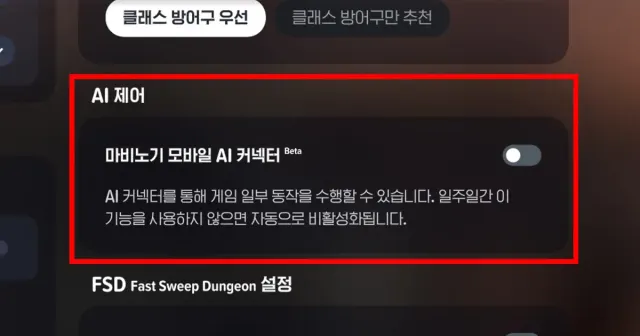
The official connector registers itself: the moment you turn on Menu (≡) → Settings → Game → AI Control, the client looks for installed AI tools and adds itself. This site is added by you, with the line above. Neither touches the other’s settings, so the order does not matter. One caution: do not edit or delete the entry the game wrote; changing it can break the official connection.
Your AI tool picks the right connector per question. All this site receives is a tool name and its arguments (say, timers_next with region=kr) — never your conversation, and never what the official connector read about your character.
| Tool | Ask it | Reply size (KB) |
|---|---|---|
| timers_next | When is the next field boss? | 2.0 |
| events_ending | What ends in the next 7 days? | 3.5 |
| search_guides | Find a guide on decor score | 3.0 |
| get_guide | Summarise that guide | 6.5 |
| myhome_plan | 650 score, 3 characters: cheapest to 3,800? | 2.0 |
| lookup | What does Myriad Streams do? | 1.9 |
| whats_new | What changed in this week's maintenance? | 12.5 |
Reply sizes measured by this site on 5 Nov with default arguments. That text counts toward your AI tool's usage; this site charges nothing.
The arithmetic: cost comes from two places only
- Spirit Wings: 5 per delegated activity through the official connector. Asking, and anything from this site, is 0.
- Your AI tool’s tokens: notice 3541579 warns that every exchange uses a little. This site’s replies run from about 2 KB for boss times to about 6.5 KB for a whole guide (table above). Ask the small things first and have the tool read a full guide only when you need it.
This site itself is free; one connection can make up to 60 calls a minute.
The usual confusion: “Isn’t an outside tool a ban risk?”
Article 11 of the operation policy is about what an AI agent does inside the game. This site’s connector never connects to the game client, never reads game files and never logs in. To the game it is the same as opening this site in a browser. In-game actions still go only through the official connector, and responsibility for them stays with the player, as the official guide says.
Nor does the official connector “browse this site for you”. It handles game information only; this site’s data comes in through this site’s connector.
What to do now
- Pick the AI tool. If you already use the official connector, add this site to that same tool: the line above for Claude Code, the connector page for the rest.
- Name it the first time: “Use mabinogi to tell me the next field boss time.” After that the tool chooses on its own.
- Mix requests: “Check which daily missions I have left (official, free), and tell me what events end this week (this site).”
- Check numbers through the links. Boss, event and maintenance data are compiled from official notices and player communities and can lag by a day; the in-game display wins.
Setting up the official connector step by step is in the AI Connector walkthrough; what it does and what it costs is in Korea’s AI Connector: what it does, and who pays.
Inline icon sources: Image source: Nexon's official Mabinogi Mobile